
Instagram Auto Reply: How It Works, What's Allowed, and Best Practices in 2026

There's a question every creator and business owner asks at some point after spending too much time manually responding to the same Instagram messages over and over again.
"Can I set up auto replies on Instagram? And will Instagram actually let me do this without getting my account flagged?"
The answer to both is yes — but with important specifics that most guides gloss over or get wrong.
Instagram auto reply is a real, officially supported feature. It's used by millions of creators, small businesses, and brands globally. Done correctly — through Instagram's official API, using a Meta-approved tool — it's fully compliant, completely safe, and one of the highest-ROI systems you can set up for your account.
Done incorrectly — using unauthorized bots, password-sharing apps, or tools that scrape data outside the official API — it's a direct path to account restrictions or a permanent ban.
This guide covers everything: what Instagram auto reply is, the different types, exactly what Meta allows and what it doesn't, how auto reply differs from full DM automation, the best practices that separate effective automation from spammy automation, and how to set up your first auto reply campaign using ReplyRush — one of the most trusted Meta-approved Instagram automation tools available in 2026.
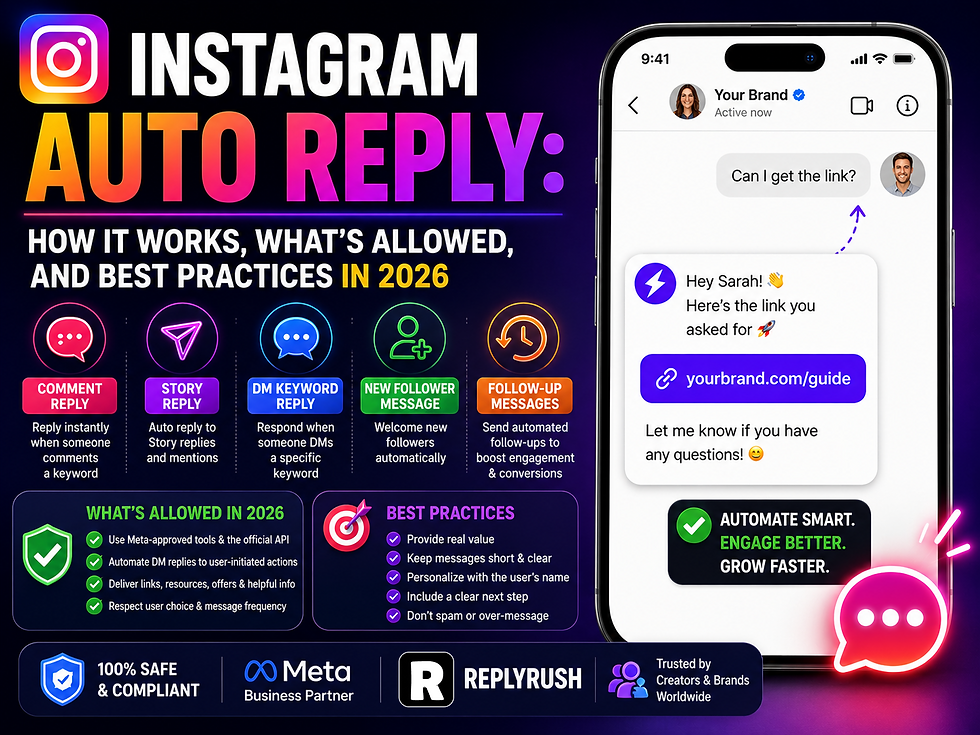
What Is Instagram Auto Reply?
Instagram auto reply is a system that automatically sends a pre-written message when a user performs a specific action on your Instagram account — without you having to manually type or send anything.
The action (called a trigger) could be:
Someone commenting a specific keyword on your post or Reel
Someone replying to your Instagram Story
Someone sending a specific keyword to your DM inbox
Someone reacting to your Story with an emoji
When the trigger condition is met, the auto reply fires. The recipient receives your pre-written message in their Instagram inbox — usually within 2 to 5 seconds of the triggering action — appearing exactly like a message you typed manually.
You write the message once. The system sends it automatically, every time, to every person who meets the trigger condition. Whether you're sleeping, traveling, filming content, or just living your life — auto reply handles it.
The Two Versions of "Auto Reply" on Instagram (And Why This Matters)
Before going deeper, there's a critical distinction that confuses a lot of people — and understanding it will save you from setting up the wrong system.
Version 1: Instagram's Native Quick Replies
Instagram has a built-in feature called "Quick Replies" (available for Business and Creator accounts). This lets you save frequently-used message templates so you can insert them quickly into a conversation with a few taps.
It's faster than typing from scratch. But here's what it's not: it's not automatic. You still have to open each DM manually, find the conversation, and tap to insert the Quick Reply. You still need to be present. Nothing happens without you.
Quick Replies are a convenience tool for manual responses. They are not auto reply automation.
Version 2: True Auto Reply Automation (via Meta-Approved Tools)
Real Instagram auto reply automation fires completely automatically — no human presence required. When the trigger condition is met, the message sends itself. You don't see it happen. You don't approve it. It just goes.
This is what most people actually want when they search for "Instagram auto reply," and it's what this guide covers. This type of automation requires a Meta-approved third-party tool because Instagram's native features don't fully support automatic sending without a trigger from a real person.
ReplyRush is a Meta Business Partner that provides this genuine auto reply automation — covering comment triggers, Story replies, DM keyword triggers, and follow-up sequences — all running through Instagram's official API.
What Types of Instagram Auto Reply Actually Exist?
There are five main auto reply types you can set up on Instagram in 2026. Each has a different trigger, a different use case, and a slightly different setup.
Type 1: Comment-to-DM Auto Reply
What it does: Sends an automatic DM to anyone who comments a specific keyword on your post or Reel.
Trigger: Someone comments "GUIDE", "FREE", "LINK", "PRICE", "YES", or any word you define.
What fires: An instant personalized DM to that person's Instagram inbox — delivering your link, resource, or offer.
Best for: Lead magnets, product link delivery, resource sharing, giveaway entry confirmation, promotional offers.
This is the most widely used auto reply type and arguably the most powerful for lead generation. When combined with a strong caption CTA, comment-to-DM auto reply converts Instagram engagement into direct conversations at a scale no manual approach can match.
Covered in detail in comment to dm automation.
Type 2: DM Keyword Auto Reply
What it does: Sends an automatic reply when someone DMs your Instagram account with a specific word or phrase.
Trigger: Someone sends "PRICING", "BOOKING", "INFO", "HELP", or any keyword directly to your inbox.
What fires: An instant automated response containing the information they asked for — pricing, booking link, FAQ answer, resource link.
Best for: Business accounts that receive consistent DM inquiries about the same topics. Eliminates the need to copy-paste the same answer dozens of times a day.
This is the closest thing to an "away message" system on Instagram — ensuring that every DM asking a common question gets an immediate, accurate response even when you're not online.
Type 3: Story Reply Auto Reply
What it does: Sends an automatic DM to anyone who replies to your Instagram Story — either with any reply or with a specific keyword.
Trigger: Someone replies to your Story (text, emoji, or specific keyword).
What fires: An instant DM delivering your lead magnet, confirming their interest, or starting an automated conversation.
Best for: Capturing leads from your most engaged existing audience. Story reply auto replies consistently produce the highest open rates of any trigger type — often reaching 95–98% because Story interactions come from your warmest followers.
Covered in full detail in Blog #6 on Instagram Story reply automation.
Type 4: Welcome Message Auto Reply
What it does: Sends an automatic message the first time someone starts a new conversation with your Instagram inbox.
Trigger: A new conversation is opened — either by someone messaging your account for the first time or by any incoming DM that isn't part of an existing thread.
What fires: A warm greeting message that sets the tone, explains what you offer, and gives the person a clear next step.
Best for: Business accounts, brands, and creators who want every new conversation to start with a strong first impression instead of an empty inbox.
Welcome message auto reply is set-and-forget. You configure it once and it greets every new conversation automatically — 24 hours a day, 7 days a week, in every time zone.
Type 5: Follow-Up Auto Reply
What it does: Sends a second (and optionally third) automated message after the first auto reply, with a time delay, if the person hasn't taken a specific action (clicked a link, replied, etc.).
Trigger: Time-based — fires X hours after the previous message was sent, conditional on non-engagement.
What fires: A gentle follow-up — resurfacing the offer, checking in, or providing additional value.
Best for: Recovering the 30–40% of people who received your first auto reply but didn't engage before getting distracted.
Follow-up auto replies are responsible for a significant portion of total conversion in any well-designed automation campaign. The first message catches people at peak interest. The follow-up catches people who meant to respond but needed a nudge.
ReplyRush supports all five auto reply types from a single dashboard, and you can run multiple campaigns simultaneously — different trigger types, different posts, different messages — all tracked and managed in one place.
What Does Meta Actually Allow? The Rules Explained Clearly
This is the section people skip and then regret. Understanding the rules before you build your system saves you from problems down the line.
Meta's rules for Instagram auto reply center on one fundamental principle: automation must respond to users who initiate contact first. It cannot be used to cold-message strangers or send unsolicited promotional messages to people who haven't engaged with you.
Here are the specific rules that apply in 2026:
Rule 1: You must use an API-approved tool. All legitimate Instagram auto reply runs through Meta's official Instagram Graph API. Tools that use browser automation (simulating human clicks), session cookies, unofficial endpoints, or that require your Instagram password directly are not API-compliant. Meta actively detects and bans accounts using these tools. If a tool asks for your Instagram password (not Facebook Login through OAuth), it's not API-compliant. Do not use it.
Rule 2: Users must initiate the interaction. You can auto reply to someone who commented on your post, replied to your Story, or messaged your inbox. You cannot proactively message people who haven't interacted with you. This rules out cold outreach automation — you cannot build a list of followers and auto-DM them all a promotional message. Only user-initiated interactions can trigger auto replies.
Rule 3: The 24-hour messaging window applies. After someone last interacts with your account (comments, replies, messages), you have 24 hours to send them follow-up messages in the DM thread. After that window closes, the conversation goes "cold" from Meta's perspective and further messaging is restricted unless they re-engage. Design your follow-up sequences to fit within this window.
Rule 4: Rate limits exist. Instagram limits automated DMs to 200 per hour through the official API. For most creators and small businesses, this limit is never reached in normal operation (200 DMs per hour means 4,800 per day — you'd need a truly viral post to approach that). For high-volume campaigns on viral content, ReplyRush automatically manages pacing to stay within limits and queues messages so none are dropped.
Rule 5: No spam behavior. Messages that are irrelevant to the trigger, excessively promotional, or sent too frequently to the same user trigger Instagram's spam detection systems. Keep messages relevant to what prompted the interaction, genuine in tone, and appropriately paced.
ReplyRush is built around these rules. Its entire architecture is designed to stay within Meta's guidelines — responding only to user-initiated triggers, respecting rate limits, never sending unsolicited messages. Your account is protected because the system was built to be compliant, not because you have to manually monitor compliance.
The Difference Between Auto Reply and Full DM Automation
This is a nuance worth clarifying because the two terms are sometimes used interchangeably, but they describe different levels of capability.
Auto reply is typically a single-message response. One trigger → one message. Someone comments "GUIDE" → they receive the guide link. Simple, clean, one step.
Full DM automation (or DM automation workflows) extends this into multi-step sequences. One trigger → a series of messages over time, with branching logic based on how the person responds, conditional follow-ups, email capture flows, lead qualification questions, and CRM integration.
In practice:
If your goal is answering common questions quickly or delivering a resource link — auto reply is sufficient.
If your goal is building an email list, qualifying leads, or running a full lead-to-conversion funnel — full DM automation with a follow-up sequence is what you need.
ReplyRush supports both. Basic auto reply campaigns are set up in minutes. Multi-step sequences with follow-ups, conditional timing, and lead capture are available on paid plans for creators and businesses who need the full funnel.
Most creators start with basic auto reply (comment trigger → deliver resource link) and add follow-up sequences once they see the volume of leads the initial trigger generates. The natural progression is: get the first auto reply live, see it work, then build the sequence around it.
8 Best Practices for Instagram Auto Reply That Actually Converts
Setting up auto reply is one thing. Getting it to consistently convert is another. Here are eight best practices drawn from real-world campaigns that separate high-performing auto reply systems from mediocre ones.
1. Write Like a Human, Not a System
The most common mistake in auto reply is letting it sound automated. Messages full of formal language, excessive punctuation, or corporate phrasing feel robotic in an Instagram DM thread.
Bad: "Thank you for contacting us. Your request has been received. Please find the requested resource at the following link: [URL]. Should you require further assistance, do not hesitate to reach out."
Good: "Hey [Name]! 👋 Here's that guide you asked for: [link]. It covers [specific thing]. Let me know if you have questions — happy to help!"
Same information. Completely different feel. The second version sounds like a real person. The first version sounds like a ticket-management system.
2. Personalize with First Name Every Single Time
Including the person's first name in your opening message increases response rates by 15–20%. It's the difference between feeling like you received a mass message and feeling like someone actually wrote to you.
ReplyRush inserts first names automatically using a personalization tag — [First Name] in your message template becomes "Sarah" or "James" or "Alex" in each person's DM. Use it in every auto reply message, without exception.
3. Deliver the Promised Thing Immediately
If your caption says "Comment GUIDE and I'll send you the guide," your auto reply must deliver the guide link in the first message. Not in the second message. Not after an intro paragraph. Immediately, in Message 1.
Any gap between what you promised and what they receive degrades trust. People commented specifically because they wanted what you advertised. Give it to them first, then add any context or follow-up asks.
4. Keep Message 1 Under 100 Words
The first auto reply should be short. People receive it while they're still in the Instagram app, often mid-scroll. They're not going to read a five-paragraph message. Keep it to 3–4 lines maximum: a greeting, the delivery, and one optional next step.
Save the longer content for follow-up messages when they've already engaged with the first.
5. Always Include a Clear Next Step
Every auto reply message should end with one clear action for the person to take. Not two. Not three. One.
"Click here to download →"
"Reply with your email to join the list"
"Tap the link to see full pricing"
"Let me know if you have questions!"
The worst auto replies deliver the resource and then go completely silent — leaving the person with no idea what to do next. Conversations that have a clear direction convert. Conversations that dead-end don't.
6. Test Your Auto Reply Before Every Major Campaign
Every time you set up a new auto reply campaign — especially before publishing a post you're expecting to drive significant engagement — run a test first.
Comment your own keyword from a test account (or a friend's). Verify:
The DM arrives within 5 seconds
The personalization tag works (it says their name, not "[First Name]")
The link works on both iPhone and Android
The message reads correctly with no broken characters or cut-off text
The follow-up fires at the right time
Five minutes of testing prevents an auto reply failure from affecting hundreds of real people.
7. Don't Send More Than 3 Messages in a Sequence Without a Re-Engagement Point
Three messages in a row without the person clicking, replying, or tapping a button starts to feel like a one-sided monologue. After 2–3 messages, insert a natural engagement point — a question they can answer, a quick-reply button to tap, or a choice between two options.
This does two things: it invites them back into an actual conversation, and it resets the 24-hour messaging window from the moment of their re-engagement.
8. Use Specific, Purposeful Keywords — Not Generic Words
The keyword you choose determines the quality and relevance of the auto reply triggers you receive. Bad keyword choices create messy, irrelevant triggers. Good keyword choices filter for genuine intent.
Avoid: Generic words like "YES," "HELP," or "HI" that people might type for unrelated reasons.
Use instead: Specific words tied directly to your offer — "RECIPE2026," "FREEGUIDE," "COACHING," "TEMPLATE," "AUDIT." These feel intentional when someone types them and signal real interest.
For accounts with high comment volume, specificity in your keyword is the difference between 200 highly relevant auto reply triggers and 500 triggers where half the people don't even remember commenting the keyword.
How to Set Up Instagram Auto Reply with ReplyRush
Here's the exact step-by-step process for getting your first Instagram auto reply live — from account connection to first triggered message.
Step 1: Create your ReplyRush account and connect Instagram
Go to replyrush.com and sign up. Choose your plan — there's a free plan available with no credit card required. Connect your Instagram account by clicking "Connect Instagram" and authenticating through Facebook Login.
Your Instagram account must be set to Business or Creator profile. If it's still on Personal, go to Instagram Settings → Account → Switch to Professional Account. Choose "Business" or "Creator" and select your category. The switch is free and takes 60 seconds.
Step 2: Choose your auto reply type
In your ReplyRush dashboard, click "New Campaign" and select the auto reply type you want:
Comment to DM — auto reply triggered by a post comment
Story Reply — auto reply triggered by a Story reply
DM Keyword — auto reply triggered by an inbox keyword
Welcome Message — auto reply for new conversations
Select the type that fits your current goal. For most creators starting out, Comment to DM is the recommended first campaign — it's the highest-volume trigger and the most impactful for lead generation.
Step 3: Configure your trigger
For Comment to DM: select the post or Reel, set your keyword (uppercase, 1 word recommended), and choose whether it applies to that specific post or all posts globally.
For DM Keyword: enter the keyword someone must send to your inbox.
For Story Reply: select the Story and define whether any reply triggers it or only a specific keyword.
For Welcome Message: no keyword needed — it fires on any new conversation.
Step 4: Write your auto reply message
Use the best practices from the section above:
Open with [First Name] personalization
Deliver the promised content immediately
Keep it under 100 words for Message 1
End with one clear next step
Sound like a real person, not a system
If you're building a sequence (Message 1 → Message 2 → Message 3), set up each message with appropriate time delays: Message 2 fires 30–60 minutes after Message 1, Message 3 fires 20–23 hours after Message 1 (just before the 24-hour window closes).
Step 5: Activate and publish
Click "Activate" in ReplyRush. Your auto reply is now live.
Go to Instagram and publish your post with the keyword CTA in the caption (for comment triggers) or your Story with the reply instruction (for Story reply). From this point, every qualifying interaction triggers an automatic DM — tracked and visible in real time in your ReplyRush dashboard.
Auto Reply vs. Spam: How to Stay on the Right Side of the Line
This is the question creators worry about most, and it's worth addressing directly.
The difference between auto reply and spam comes down to consent and relevance.
Auto reply is consent-based: the person triggered it themselves by taking a specific action (commenting, replying, messaging). They asked for a response. Your auto reply delivers it.
Spam is unsolicited: messages sent to people who haven't asked for them, didn't initiate contact, and have no reason to expect to hear from you.
Instagram's API rules enforce this distinction at the system level. Through ReplyRush, you literally cannot send a message to someone who hasn't triggered the automation first. The architecture prevents unsolicited messaging — not just by policy, but by design.
The behaviors that cross into spam territory — even with API tools — are:
Setting overly broad keywords that trigger on any comment (like "the" or "I") — creating DMs that feel random and disconnected
Sending 5+ messages in rapid succession to the same person
Sending the same promotional message repeatedly over multiple days without re-engagement
Writing messages that have nothing to do with what prompted the trigger
Avoid these and your auto reply system stays firmly in the "genuinely helpful business communication" category — which is exactly where it belongs.
What Your Competitors Are Doing (And Why You're Falling Behind Without Auto Reply)
Here's the uncomfortable reality of Instagram in 2026.
Businesses and creators who are growing the fastest are not replying to every DM manually. They built systems. They set up comment triggers on every piece of content that drives engagement. They have welcome messages for every new inbox conversation. They have keyword triggers for their 5 most common questions. And they have follow-up sequences running automatically behind every one of those triggers.
While those businesses are capturing every lead, answering every question instantly, and converting interested followers into email subscribers and customers at scale — your competitors who haven't set this up are sleeping through DMs at 2am, manually copy-pasting the same answer for the hundredth time, and watching interested followers move on because no one responded quickly enough.
Speed is not a nice-to-have on Instagram. According to business response time research, companies that respond within 5 minutes are 9x more likely to convert a lead than those that wait even an hour. Instagram auto reply doesn't just respond within 5 minutes — it responds within 5 seconds.
That gap — between 5 seconds and "sometime tomorrow when I check my phone" — is where leads are won and lost.
Instagram Auto Reply for Different Business Types
Auto reply strategy varies based on what you're selling and who your audience is. Here's how different types of accounts apply it most effectively.
Creators and Influencers: Comment-to-DM auto reply for lead magnets, affiliate links, and brand partnership inquiries. Story reply automation for email list building. DM keyword triggers for "collab," "rate card," and "media kit" inquiries.
eCommerce Brands: Comment triggers delivering specific product links, discount codes, and size/availability information. Welcome messages with "Shop Now" and "Track Order" quick-reply buttons. FAQ keyword triggers for shipping, returns, and sizing questions.
Coaches and Consultants: Comment triggers delivering free resources (guides, templates, case studies). Story reply automation for enrollment and discovery call bookings. DM keyword triggers for "pricing," "book," and "apply."
Local Service Businesses: Welcome messages with "Get a Quote," "Book Appointment," and "See Our Work" options. FAQ keyword triggers for location, hours, and pricing. Comment triggers on before/after content delivering portfolio links and booking pages.
Food Creators: Comment triggers on recipe content delivering full recipe links. Story reply automation for ingredient lists and shopping guides. Keyword triggers like "RECIPE" and "INGREDIENTS" on cooking content.
Every business type has a different set of most common interactions and most valuable automated responses. The core system — trigger → instant DM → follow-up — applies universally. What changes is the specific content of each message and the context of each trigger.
Frequently Asked Questions
Is Instagram auto reply free?
Instagram's native Quick Replies feature is free but requires manual activation per message. True auto reply automation (which fires without any human involvement) requires a third-party Meta-approved tool. ReplyRush offers a free plan that includes auto reply functionality — so you can start at no cost and upgrade when you need higher DM volume or advanced features.
Does Instagram auto reply work on Reels?
Yes. Comment-to-DM auto reply works on Instagram Reels, feed posts, and carousels. Reels generate the most comment volume of any content type, making them the most impactful trigger surface for auto reply campaigns.
Can I set up auto reply without a Business or Creator account?
No. Instagram's API — which powers all legitimate auto reply automation — only works with Business or Creator accounts. Personal accounts don't have API access. Switching to a Professional account is free and takes less than a minute in Instagram Settings.
Will auto reply affect my engagement rate?
Positively. Every triggered comment (someone commenting your keyword) counts as engagement on your post. Higher comment volume signals strong engagement to Instagram's algorithm, which increases how widely your content gets distributed. Auto reply campaigns that drive keyword comments also drive organic reach — a dual benefit.
Can I use auto reply to collect emails on Instagram?
Yes. A two-step auto reply sequence — first message delivers your resource, second message asks for their email — captures email addresses directly inside Instagram DMs without needing an external landing page. ReplyRush supports in-DM email capture in its follow-up sequence builder.
How do I stop auto reply from going to the same person twice?
ReplyRush prevents duplicate sends by default. Each person only receives the automated DM once per campaign, even if they comment the trigger keyword multiple times. This prevents spam-like behavior and ensures your automation only creates positive experiences.
What if my post goes viral and I get thousands of comments?
ReplyRush includes high-volume management features — automatic pacing during viral comment surges and a SendBack system that retries any failed sends. When comment velocity spikes beyond Instagram's rate limits, messages are queued and delivered in sequence rather than dropped. No triggered person gets missed.
The Bottom Line
Instagram auto reply is not a shortcut. It's not gaming the system. It's a legitimate, officially supported, Meta-approved way to respond to people who are actively engaging with your content — instantly, every time, without burning yourself out.
Every person who comments your keyword on a Reel is raising their hand and saying "I want this." Every Story reply is a warm follower saying "I'm interested." Every DM asking "what's the price?" is a potential customer.
Auto reply makes sure none of those raised hands go unanswered. It captures them at the moment of highest intent, delivers exactly what was promised, and starts the conversation that leads to a conversion.
ReplyRush is built specifically for this — a Meta-approved, Instagram-first automation tool that handles comment triggers, Story replies, DM keywords, welcome messages, and follow-up sequences in one clean, no-code dashboard. Free plan available. Setup in under 5 minutes.


Totally feel this—manual DMs were consuming so much of my day before I finally set up automated responses. Aside from auto-replies, another quick hack that saved me a ton of time with post planning was using a click here tool to draft and preview my layouts before publishing. It makes mockups super easy to share with clients or team members for quick approval. Definitely recommend looking into it if you're trying to streamline your whole Instagram workflow!
Setting up auto replies helps keep response times fast, but keeping track of who actually reaches out is just as important for building genuine engagement. Checking audience activity with tools like recently-followed.com makes it easy to monitor incoming profile interactions and see whether your automated welcome DMs are converting new accounts into active community members. Balancing quick automated replies with real, personalized interactions keeps your direct messages organized without making your brand look like a mindless robot.