
How to Automate Instagram DMs for a Webinar Funnel (Step-by-Step)

Updated: May 26
Webinars remain one of the highest-converting sales mechanisms available to coaches, course creators, consultants, and service businesses. When done right, a single 60-minute live training can convert 10–20% of attendees into paying customers or clients — which is extraordinary by any marketing channel's standards.
The bottleneck for most people running webinars is not the webinar itself. It's the two stages around it: getting enough qualified people registered in the first place, and getting enough of those registrants to actually show up and stay through to the offer.
Email has been the traditional answer for both problems. Build an email list, send registration confirmation emails, send reminder sequences, follow up with replays. This works — but with average email open rates of 20–25%, more than three-quarters of your webinar communication is never even seen.
Instagram DMs solve this problem structurally. With 85–90% open rates and the intimacy of a channel people check like text messages, every registration confirmation, every reminder, and every replay link you send through Instagram DMs reaches nearly every person who signed up — not just one in four.
This guide walks through the complete Instagram webinar funnel — from driving registrations through comment automation to delivering the replay and following up after the event — using ReplyRush as the automation backbone. Every step is designed to run without manual work, so your job is showing up and delivering the webinar, not managing a DM inbox.
Why Instagram Is the Perfect Webinar Promotion Channel
Before building the funnel, let's understand why Instagram specifically works so well for webinar promotion and attendance — because the reasons shape how you design every part of the system.
The audience is already warm. People who follow you on Instagram and watch your content have been consuming your expertise for weeks or months. They're not cold registrants who stumbled onto a landing page via a paid ad. They know your style, they've gotten value from your content, and they have a reason to believe the webinar will be worth their time. Warm audience show-up rates consistently exceed cold traffic rates by 15–25 percentage points.
DMs replace the email inbox. Every email your webinar reminder competes with is working against your open rate. Your Instagram DM reminder competes with messages from people's friends and family — and it sits in the same inbox, with the same visual weight. Most people check their Instagram DMs within minutes. The same person might let 47 emails sit unread while clearing every DM the moment it arrives.
The registration moment and the DM moment are in the same app. When someone comments your keyword on a Reel and immediately receives a confirmation DM — all within 5 seconds, all within Instagram — the friction is zero. There's no context switch, no external page to load, no form to fill. The comment was the registration. The DM confirmed it. They're done, and they're already in the channel where you'll send their reminders.
Instagram comments signal quality intent. Someone who watched your webinar preview Reel and actively typed a comment to register is more engaged than someone who clicked a Facebook ad and auto-filled their email. The extra micro-commitment of commenting a keyword is a behavioral signal that this person is more likely to show up.
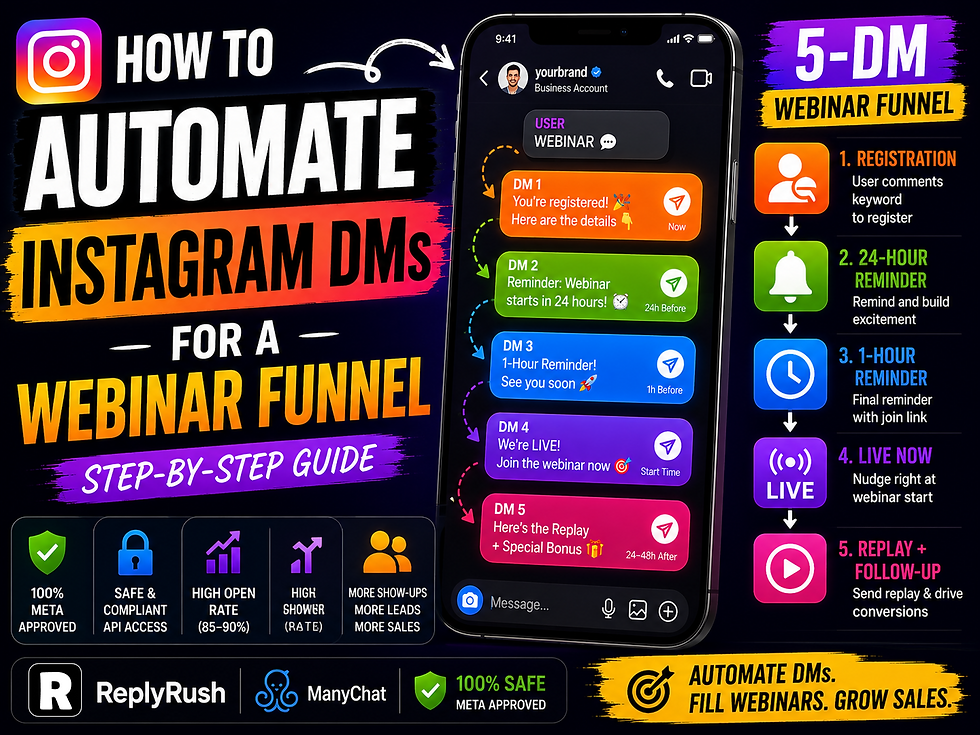
The Complete 5-DM Webinar Funnel: The Architecture
A fully automated Instagram webinar funnel has five distinct DM touchpoints, each serving a specific purpose in the registration-to-sale journey. Here's the complete architecture before we go into the setup.
DM 1 — Registration Confirmation (fires immediately on keyword comment) Confirms they're registered, provides the webinar details, creates excitement, and sets expectations for what's coming.
DM 2 — 24-Hour Pre-Webinar Reminder (fires 24 hours before the webinar) Reactivates interest, reminds them what they'll learn, and includes the join link so it's already in their DM thread.
DM 3 — 1-Hour Pre-Webinar Reminder (fires 60 minutes before the webinar) Final urgency nudge. The join link again. A one-line hook about what they're about to learn. Short and action-oriented.
DM 4 — "We're Live!" Message (fires at webinar start time) An optional real-time nudge sent as the webinar begins. This one can't be fully automated by timing alone — it requires either a manual send or a scheduled broadcast, depending on your ReplyRush plan setup. Many creators choose to skip this one and let DMs 1–3 do the attendance work.
DM 5 — Replay Link (fires 24–48 hours after the webinar) For attendees who watched and haven't yet converted, or for registrants who missed the live session. Delivers the replay link with a time-limited access window that creates urgency.
Let's build each one.
Phase 1: Driving Webinar Registrations Through Comment Automation
The registration phase starts with a piece of content — a Reel, a post, or a Story — that makes someone want to attend your webinar. The content needs to answer one question clearly: "What will I be able to do after attending this webinar that I can't do now?"
This is not the place for vague promises ("Join me for my free training on Instagram growth"). It's the place for specific outcomes ("In 60 minutes, I'll walk you through the exact DM system that booked 47 coaching calls in one month — from one Reel, no ads").
Webinar registration Reel caption template:
"I'm running a free live training on [specific topic] on [date] at [time — include timezone].
In 60 minutes, you'll learn [specific outcome 1], [specific outcome 2], and [specific outcome 3].
Comment WEBINAR and I'll DM you the registration link + a spot in the call — completely free.
👇 WEBINAR in the comments"
When someone comments "WEBINAR," ReplyRush fires the first DM instantly.
DM 1 — Registration Confirmation:
"Hey [First Name]! You're registered for [Webinar Name] 🎉
Here are your details: 📅 Date: [Date] ⏰ Time: [Time + Timezone] 🔗 Join link: [Zoom/Webinar link]
Save this DM so you have the link handy — I'll also send you a reminder the day before.
Can't wait to see you there! This is going to be really practical."
This message does everything a great confirmation does: it creates a positive emotional response (they're in, something exciting is happening), gives them all the information they need in one place, and sets an expectation about what's coming (the reminder DM). That last element — "I'll also send you a reminder" — is important because it pre-approves the next DM in your sequence.
Phase 2: Maximizing Show-Up Rates With DM Reminders
The show-up rate problem is real. The average free webinar achieves a show-up rate of 25–35% from email-only promotion. Most people registered with genuine intent, but between registration and the webinar date, they got busy, forgot, got distracted by other things, and never made it to the calendar.
DM reminders cut through this problem in a way email simply cannot. Here's why: when your reminder arrives in someone's Instagram DM inbox, they're already in Instagram mode — browsing, watching content, checking in on their social life. Your reminder is contextually appropriate in a way that an email at 7am asking them to click a Zoom link is not.
DM 2 — 24-Hour Reminder:
"Hey [First Name]! Just a reminder — [Webinar Name] is tomorrow at [Time + Timezone] 📅
Tomorrow I'm covering [the most compelling specific thing they'll learn — make this feel unmissable].
Here's your join link: [link] — see you tomorrow!"
The key element in this reminder is the "most compelling specific thing." Don't summarize the whole webinar — pick the one piece of content or the one revelation that, if they only knew it was in the session, would make them prioritize attending over anything else that might come up.
DM 3 — 1-Hour Reminder:
"Hey [First Name]! [Webinar Name] starts in 1 hour 🚀
Join link: [link]
[One-line hook — the most exciting/surprising thing that happens in the first 10 minutes of your webinar]
See you in there!"
This reminder is short and action-oriented by design. At this point, the decision of whether to attend has already been made — this reminder's only job is to give them the link again and get them to click it. Don't add friction by making them read a paragraph.
Phase 3: The Replay Funnel — Converting People Who Missed It
A significant percentage of registrants will not attend the live session — typically 40–60% won't show up even with DM reminders. This is normal and expected. What's not normal — but completely achievable — is having a system that captures those people through the replay.
The replay DM is sent 24–48 hours after the webinar. Its job is to get non-attendees to watch the replay, experience the webinar content, and have the opportunity to convert on your offer.
DM 5 — Replay Link (for registrants who didn't attend):
"Hey [First Name]! Hope everything's okay — I noticed you couldn't make it to [Webinar Name] live.
The good news: I've made the replay available for the next [48/72 hours]. Everything we covered is in there, including [the most compelling specific outcome].
Watch it here: [replay link]
Let me know what you think — I'd love to hear your takeaway!"
The tone of this message is key: "I noticed you couldn't make it" treats the person as if they were specifically expected and missed. That's not manipulation — it's the natural language of someone who genuinely wanted you at the event and is giving you a second chance. It works far better than the standard "In case you missed it..." format.
For attendees who watched but haven't converted, a different replay DM can be sent:
DM 5 — Offer Follow-Up (for attendees who watched but didn't purchase):
"Hey [First Name]! Thanks for joining [Webinar Name] — hope you found it valuable 😊
Quick reminder: the special offer I mentioned at the end ([what the offer is + the benefit/price]) closes at [deadline].
If you have any questions before deciding, just reply here and I'll help. Here's the page again: [sales/enrollment link]"
This message converts attendees who are still on the fence by giving them a deadline reminder and an invitation to ask questions — the most direct path to removing final objections.
Phase 4: The Post-Webinar Lead Nurture Sequence
Not everyone who registers for and attends a free webinar will convert immediately — especially for higher-priced programs or services. For these prospects, a post-webinar DM nurture sequence extends the conversation and keeps the relationship warm for 7–14 days after the event.
This sequence typically has 2–3 additional messages, each delivering standalone value while keeping the offer visible:
Nurture Message 1 (48 hours after webinar, for non-converters):
"Hey [First Name]! One thing I didn't get to cover fully in the webinar was [tangential but valuable topic]. Here's a quick resource on it: [link to a blog post, free resource, or case study].
Separately — [offer name] closes [in X days/on date]. Just flagging in case it helps with timing!"
Nurture Message 2 (5–7 days post-webinar, for non-converters):
"Hey [First Name]! Checking in — [Name], a [target client type] I worked with recently, just [specific result/milestone]. Sharing in case it's inspiring.
Still here if you have questions about [offer/program]. What would be most helpful to know?"
The nurture sequence maintains contact without becoming spammy by leading with value in every message and making the offer mention brief, non-pushy, and clearly optional. This sequence typically converts an additional 5–10% of webinar attendees who didn't purchase immediately.
Setting Up the Full Webinar Funnel in ReplyRush: Step-by-Step
Now let's put this into practice with the exact ReplyRush configuration for each phase.
Step 1: Pre-webinar setup (do this the day before promoting)
Create your webinar registration page or Zoom event and get the join link. Prepare your 5 DM messages using the templates above, customized with your specific webinar details, date/time, and offer.
Step 2: Create the registration campaign
In your ReplyRush dashboard, click New Campaign → Comment to DM. Select your promotion Reel/post, set keyword to "WEBINAR" (or your chosen word), and enter DM 1 (registration confirmation) as your first message.
For the Story-based registration flow: create a second campaign → Story Reply, set keyword to "REGISTER" or "JOIN", and use the same DM 1 message. This captures registrations from both Reel comments and Story replies simultaneously.
Step 3: Configure the reminder sequence
In ReplyRush's campaign sequence builder, add follow-up messages with specific time delays:
Message 2 (24-hour reminder): Set to fire approximately 24 hours before your webinar's scheduled start time. Calculate the delay from campaign activation to webinar start and set accordingly.
Message 3 (1-hour reminder): Set to fire 1 hour before webinar start.
Important note on timing: ReplyRush's follow-up sequences are triggered relative to the time of the original DM, not the webinar date/time. This means if someone registers 3 days before your webinar, your timing delays need to accommodate that. For webinars with a fixed date, the cleanest approach is to run the registration campaign for a specific window and configure message timing accordingly. If your audience tends to register over multiple days, consider sending reminders manually via a scheduled blast rather than relying solely on automated delays — ReplyRush's bulk message feature handles this efficiently.
Step 4: Set up the replay campaign
After your webinar ends, create a new campaign or scheduled message in ReplyRush delivering the replay link to all registrants. Set the timing to 24–48 hours post-webinar. Include conditional logic if possible: attendees vs. non-attendees receive different versions (the "offer follow-up" vs the "you missed it" message).
Step 5: Activate, promote, and monitor
Activate your registration campaign and publish your promotional content. Monitor registrations in your ReplyRush dashboard in real time. On webinar day, check that your reminder messages are queued and scheduled correctly.
After the event, activate your replay campaign and monitor click rates on the replay link and offer page — these tell you the health of your post-webinar conversion.
The Webinar + DM Funnel: What the Numbers Look Like
Here's a realistic performance scenario for a mid-sized creator account running a webinar with Instagram DM automation.
Setup: Business coach with 18,000 Instagram followers. Running a free 60-minute webinar on "How to Sign Your First 5 Coaching Clients Using Instagram." Promotional content: 2 Reels + 4 Stories over 5 days pre-webinar.
Registration phase:
Reel 1 (7,800 views): 180 keyword comments → 178 registration confirmation DMs sent
Reel 2 (12,400 views): 290 keyword comments → 287 registration DMs sent
Stories (2,600 views each): 94 total Story reply registrations
Total registered: 559 people
Show-up rate with DM reminders:
24-hour DM reminder: 91% open rate (508 of 559 opened)
1-hour DM reminder: 88% open rate
Actual show-up: 262 attendees (47% show-up rate — well above the 25–35% email average)
Conversion:
Live offer presented at minute 48 of the webinar: $997 coaching program
Immediate purchases during webinar: 14 (5.3% of attendees)
Replay watches (sent to 297 non-attendees): 178 watched (60% replay watch rate)
Post-replay purchases: 8 additional
Post-webinar nurture sequence purchases (over 7 days): 6 additional
Total result: 28 enrollments × $997 = $27,916 in revenue from one webinar, promoted entirely through Instagram organic content + DM automation. No paid ads. No email list required.
These numbers will vary significantly based on niche, offer price, and content quality. But the structural advantage is clear: DM-delivered reminders produce show-up rates 15–20 points higher than email alone, and higher show-up rates directly translate into more conversions from the same audience.
Frequently Asked Questions
Can I use Instagram DM automation to collect email addresses from webinar registrants?
Yes. Add a message in your registration sequence asking for their email: "We'll also be sending resources to email — want to drop your email here so I can send you the prep materials?" This captures email alongside the Instagram DM channel, giving you two ways to reach registrants.
What if my webinar platform requires registrants to fill out a form?
Your keyword DM can deliver the external registration form link rather than handling everything in DMs. The DM says: "Here's your registration link: [external form]. Once you fill it in, you'll be on the list — I'll DM you a reminder the day before too!" This combines the immediacy of DM delivery with your webinar platform's form-based registration.
How do I handle time zone differences for my reminder DMs?
Instagram DM automation through ReplyRush sends reminders at a fixed delay from registration time, not at a specific local time. For international audiences, the simplest workaround is to run your webinar at a time that works across multiple zones, mention the time in multiple zones in your confirmation DM, and send reminders at a time that's reasonable for your primary audience.
Is there a limit to how many registration DMs I can send?
Instagram's API supports up to 200 DMs per hour. For most webinar promotions, even successful ones, this limit won't be an issue. If your Reel goes viral and comment volume surges rapidly, ReplyRush's automatic rate management queues messages safely so every registrant gets their confirmation.
Can I run this same funnel for paid virtual events?
Yes. The funnel structure is identical — the only difference is that your registration DM delivers a payment link rather than a free join link. "Comment SUMMIT to register — I'll DM you the payment link for [event name]" works the same way. For paid events, you may want to add a brief qualifier in the first DM ("limited to [X] seats") to create appropriate urgency.
The Bottom Line
Webinars are one of the most powerful tools in any digital business's conversion toolkit. But their effectiveness has always been limited by two things: getting qualified people registered, and getting them to show up.
Instagram DM automation solves both problems simultaneously. Comment-to-DM triggers capture warm registrants at peak intent, within the app they're already using. DM reminders reach them in a channel they open at 90% rates — not the email inbox where webinar reminders routinely go unread. And the post-webinar replay sequence captures everyone who missed the live session and keeps the conversion window open for 48–72 additional hours.
The complete funnel — registration confirmation, 24-hour reminder, 1-hour reminder, replay delivery, and post-webinar nurture — can be built in a single afternoon in ReplyRush and runs automatically for every registration that comes in through your promotional content.
The webinar stays yours. The audience work stays yours. Everything in between is automated.


Comments